> For the complete documentation index, see [llms.txt](https://lti.gitbook.io/user_guide/llms.txt). Markdown versions of documentation pages are available by appending `.md` to page URLs; this page is available as [Markdown](https://lti.gitbook.io/user_guide/zh-cn/yong-hu-zhi-nan/zhang-hu-xiang-qing/gen-dan-ding-yue-ye-mian.md).
# 跟单订阅页面
### 主账户
在主账户的 跟单订阅(Subscriptions)页面,您可以查看已订阅该主账户的投资账户列表。
每项跟单订阅均显示以下信息:
#### 登录账号
已订阅投资账户的账号。
***
#### 净值
已订阅投资账户的当前净值。
***
#### 货币
投资账户的计价货币。
***
#### 已支付费用
自创建跟单订阅以来,从投资账户收取的费用总额。
***
#### 费用方案
点击**查看(View)**,查看该跟单订阅所采用的费用方案。
***
#### 状态和起始日期
跟单订阅的状态:
* **有效(Active)-** —跟单订阅已启用。
* **已取消订阅(Unsubscribed)-** —跟单订阅已终止。
同时显示该跟单订阅的创建日期。
### 投资账户
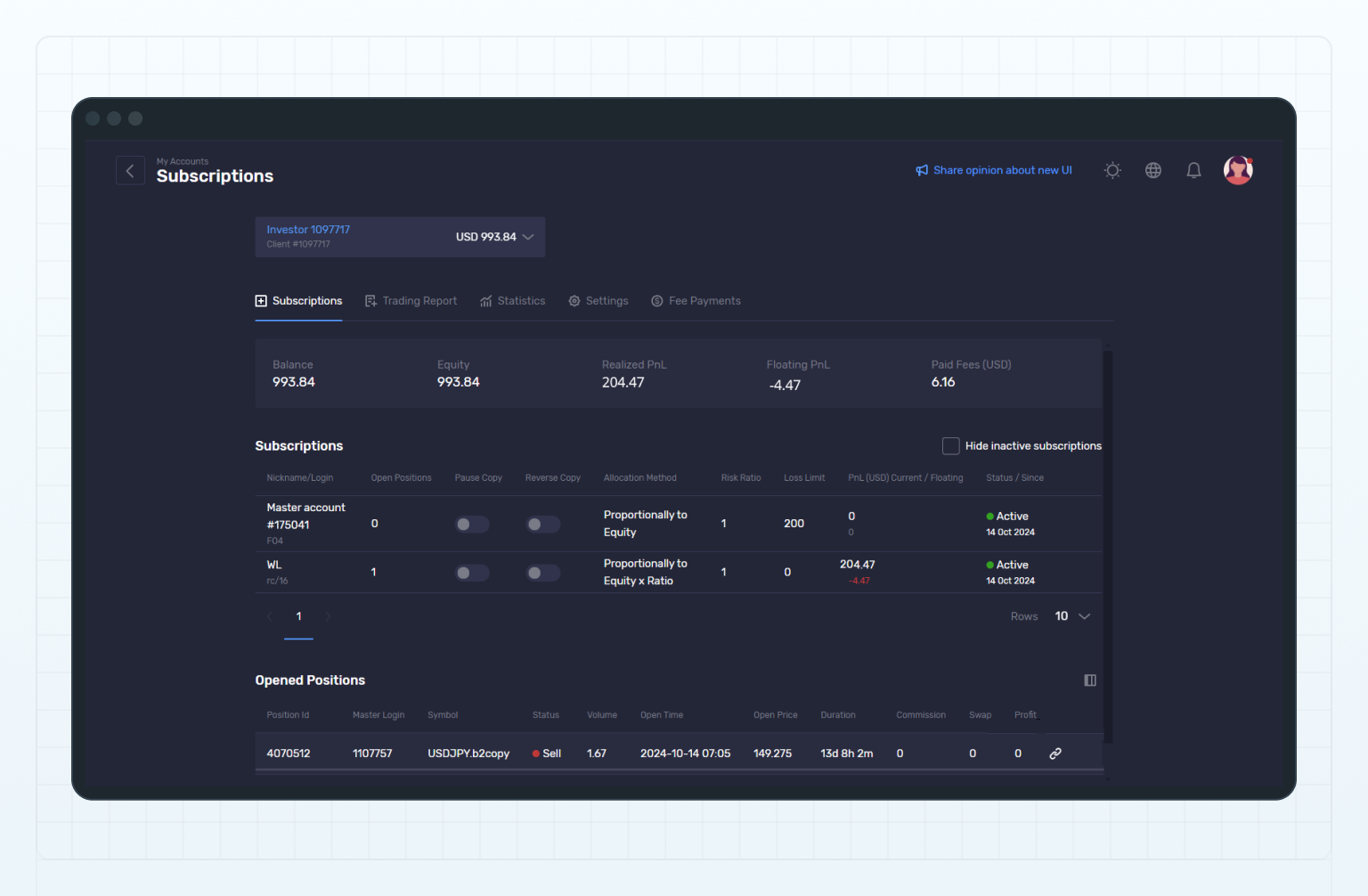
在投资账户的 跟单订阅(Subscriptions)页面,您可以查看该投资账户已订阅的主账户列表。
Subscriptions
每项跟单订阅均显示以下信息:
#### 昵称/登录账号
主账户名称及交易员昵称。
***
#### 未平仓头寸
通过该跟单订阅复制的未平仓头寸数量。
***
#### 暂停跟单
启用开关可暂停跟单订阅;关闭开关可恢复跟单。有关详细信息,请参阅**暂停或恢复跟单订阅**。
***
#### 反向跟单
启用开关后,从主账户复制头寸时会反转交易方向;关闭开关后,将按照主账户原有的交易方向复制头寸。
有关详细信息,请参阅**启用或禁用跟单订阅的反向跟单功能**。
***
#### 分配方式
*仅针对跟单交易订阅显示。*
用于确定从主账户分配至已订阅投资账户的头寸交易量。
#### 风险比例
*仅针对跟单交易订阅显示。*
为该跟单订阅设置的风险比例。复制头寸至投资账户时,系统会使用该比例计算头寸规模。
有关详细信息,请参阅**为跟单订阅设置风险比例**。
***
#### 亏损限额
为该跟单订阅设置的最大允许亏损金额。
有关详细信息,请参阅**为跟单订阅设置风险限额**。
***
#### 盈亏(USD):当前/浮动
上方数值表示根据该跟单订阅所复制头寸计算的当前盈亏;下方数值表示相应头寸的浮动盈亏。两个数值均以 USD 显示。
#### 状态和起始日期
跟单订阅的状态:
* **有效(Active)-** —跟单订阅已启用。
* **已取消订阅(Unsubscribed)-** —跟单订阅已终止。
同时显示该跟单订阅的创建日期。
每行跟单订阅记录的右侧均显示**操作按钮(⋮)**。点击该按钮可使用以下选项:
* **编辑(Edit)-** —更改分配方式、风险比例或亏损限额。
* **查看费用方案(View Fee Plan)-** —查看该跟单订阅所采用的费用方案。
* **查看已支付费用(View Paid Fees)-** —前往 费用支付(Fee Payments)页面,查看与该跟单订阅相关的费用支付交易记录。
* **取消订阅(Unsubscribe)-** —终止跟单订阅,并取消投资账户对主账户的订阅。
---
# Agent Instructions
This documentation is published with GitBook. GitBook is the documentation platform designed so that both humans and AI agents can read, navigate, and reason over technical content effectively. Learn more at gitbook.com.
## Querying This Documentation
If you need additional information that is not directly available in this page, you can query the documentation dynamically by asking a question.
Perform an HTTP GET request on the current page URL with the `ask` query parameter, and the optional `goal` query parameter:
```
GET https://lti.gitbook.io/user_guide/zh-cn/yong-hu-zhi-nan/zhang-hu-xiang-qing/gen-dan-ding-yue-ye-mian.md?ask=&goal=
```
`ask` is the immediate question: it should be specific, self-contained, and written in natural language.
`goal` is optional and describes the broader end goal you are ultimately trying to accomplish on behalf of the user. GitBook uses it to tailor the answer towards what is most useful for that goal.
The response will contain a direct answer to the question and relevant excerpts and sources from the documentation.
Use this mechanism when the answer is not explicitly present in the current page, you need clarification or additional context, or you want to retrieve related documentation sections.