> For the complete documentation index, see [llms.txt](https://lti.gitbook.io/user_guide/llms.txt). Markdown versions of documentation pages are available by appending `.md` to page URLs; this page is available as [Markdown](https://lti.gitbook.io/user_guide/zh-cn/yong-hu-zhi-nan/zhang-hu-xiang-qing/fei-yong-zhi-fu-ye-mian.md).
# 费用支付页面
### 主账户
在主账户的费用支付页面,您可以查看从已订阅投资账户中收取的费用支付记录。
您可以按照以下列对费用支付记录进行排序:
* 日期/时间 - —按照费用支付日期排序。
* 金额 - —按照费用金额排序。
如需排序,请将鼠标悬停在相应的列标题上,然后点击显示的向上箭头(↑)或向下箭头(↓),以升序或降序排列记录。
如需筛选从特定投资账户收取的费用,请在按登录账号搜索字段中输入账户号码,然后按 Enter 键。
每笔费用支付记录均显示以下信息:
**来源投资账户**
被收取费用的投资账户账号。
***
**费用 ID(投资账户)**
从投资账户中扣除费用时所生成的交易标识符。
***
**收款主账户**
接收费用的钱包名称。
***
**费用 ID(主账户)**
将费用存入主账户所有者账户时所生成的交易标识符。
***
**费用类型**
已支付费用的类型。有关详细信息,请参阅费用列表。
***
**费用设置**
主账户费用方案中规定的费率,以及适用情况下的费用支付周期。
***
**金额**
费用金额。
***
**日期/时间**
费用支付的日期和时间。
### 投资账户
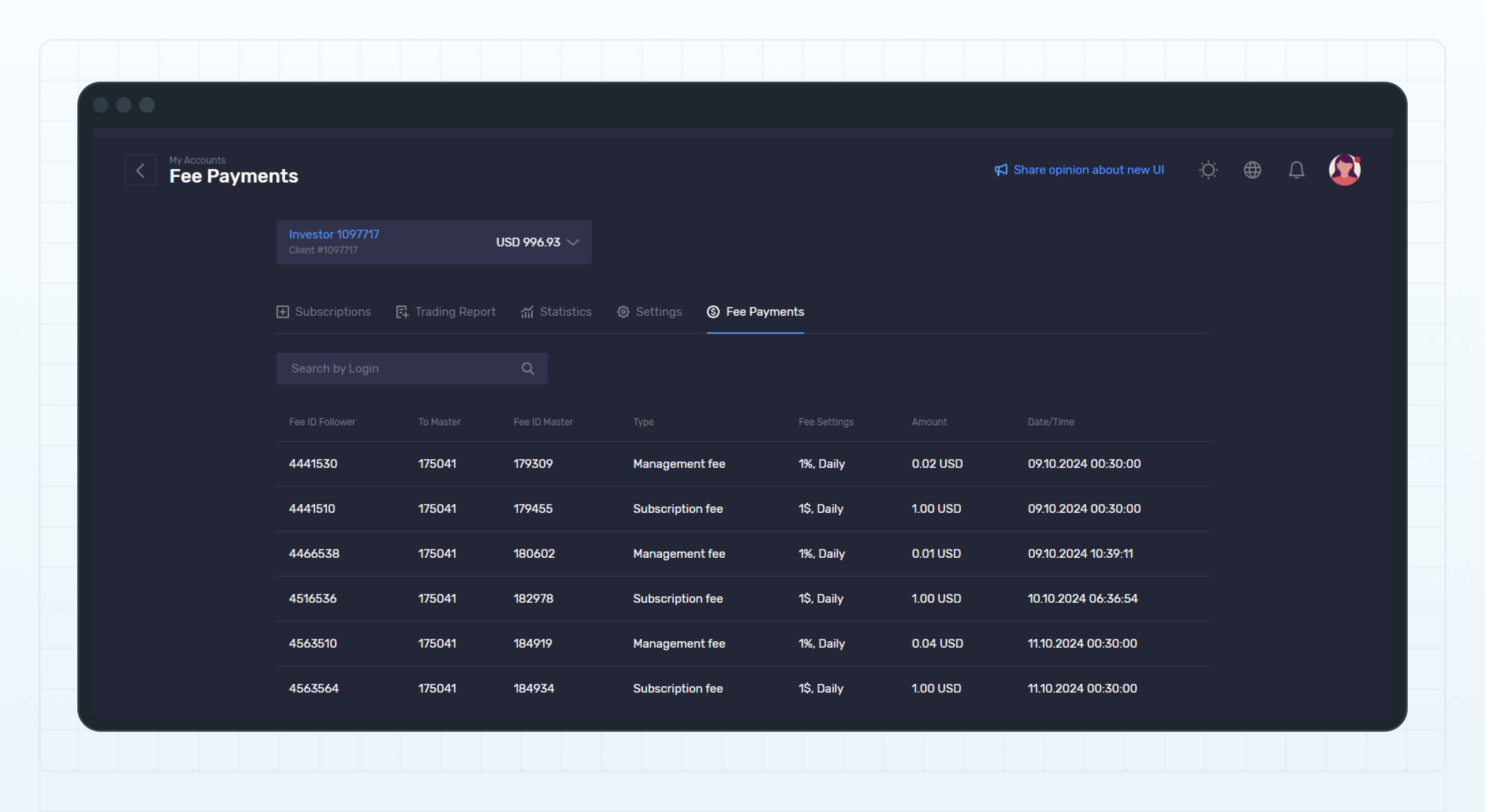
在投资账户的费用支付页面,您可以查看该投资账户在所有跟单订阅中被收取的费用记录。
Fee Payments page of an investment account
您可以按照以下列对费用支付记录进行排序:
* 日期/时间 - —按照费用支付日期排序。
* 金额 - —按照费用金额排序。
如需排序,请将鼠标悬停在相应的列标题上,然后点击显示的向上箭头(↑)或向下箭头(↓),以升序或降序排列记录。
如需筛选支付给特定主账户的费用,请在按登录账号搜索字段中输入该账户号码,然后按 Enter 键。
每笔费用支付记录均显示以下信息:
**费用 ID(投资账户)**
从投资账户中扣除费用时所生成的交易标识符。
***
**收款主账户**
接收费用的主账户账号。
***
**费用 ID(主账户)**
将费用存入主账户所有者账户时所生成的交易标识符。
***
**费用类型**
已支付费用的类型。有关详细信息,请参阅费用列表。
***
**费用设置**
主账户费用方案中规定的费率,以及适用情况下的费用收取周期。
***
**金额**
费用金额。
***
**日期/时间**
费用支付的日期和时间。
---
# Agent Instructions
This documentation is published with GitBook. GitBook is the documentation platform designed so that both humans and AI agents can read, navigate, and reason over technical content effectively. Learn more at gitbook.com.
## Querying This Documentation
If you need additional information that is not directly available in this page, you can query the documentation dynamically by asking a question.
Perform an HTTP GET request on the current page URL with the `ask` query parameter, and the optional `goal` query parameter:
```
GET https://lti.gitbook.io/user_guide/zh-cn/yong-hu-zhi-nan/zhang-hu-xiang-qing/fei-yong-zhi-fu-ye-mian.md?ask=&goal=
```
`ask` is the immediate question: it should be specific, self-contained, and written in natural language.
`goal` is optional and describes the broader end goal you are ultimately trying to accomplish on behalf of the user. GitBook uses it to tailor the answer towards what is most useful for that goal.
The response will contain a direct answer to the question and relevant excerpts and sources from the documentation.
Use this mechanism when the answer is not explicitly present in the current page, you need clarification or additional context, or you want to retrieve related documentation sections.