> For the complete documentation index, see [llms.txt](https://lti.gitbook.io/user_guide/llms.txt). Markdown versions of documentation pages are available by appending `.md` to page URLs; this page is available as [Markdown](https://lti.gitbook.io/user_guide/zh-cn/yong-hu-zhi-nan/guan-li-zhu-zhang-hu-he-tou-zi-zhang-hu/she-zhi-yu-he-zuo-huo-ban-gong-xiang-fei-yong-de-you-hui-huo-dong.md).

# 设置与合作伙伴共享费用的优惠活动

*仅适用于独立部署解决方案*

您可以为主账户设置优惠活动，将您获得的部分费用与合作伙伴共享。

优惠活动会将优惠码与合作伙伴的账户关联。当合作伙伴推荐的投资者使用该优惠码订阅您的主账户时，投资者可以获得折扣费用方案，同时系统会自动将这些订阅所产生费用的预设比例分配给合作伙伴。

通过此类优惠活动，您无需实施完整的 IB 计划，即可高效开展合作伙伴推广活动。

{% hint style="info" %}
Web UI 中可能会显示或隐藏 优惠活动（Promo offer）部分。此设置由投资平台管理员控制。
{% endhint %}

为合作伙伴设置费用共享优惠活动：

{% stepper %}
{% step %}
在主菜单中展开相应的服务项目，例如 **Copy Trading、PAMM** 或 **MAM**，然后点击**账户列表（Account List）**。
{% endstep %}

{% step %}
在账户列表中点击相应的主账户。
{% endstep %}

{% step %}
在账户详情中，前往 设置（Settings）页面。
{% endstep %}

{% step %}
在**优惠活动（Promo offers）部分，点击添加新优惠（Add new offer）**。
{% endstep %}

{% step %}
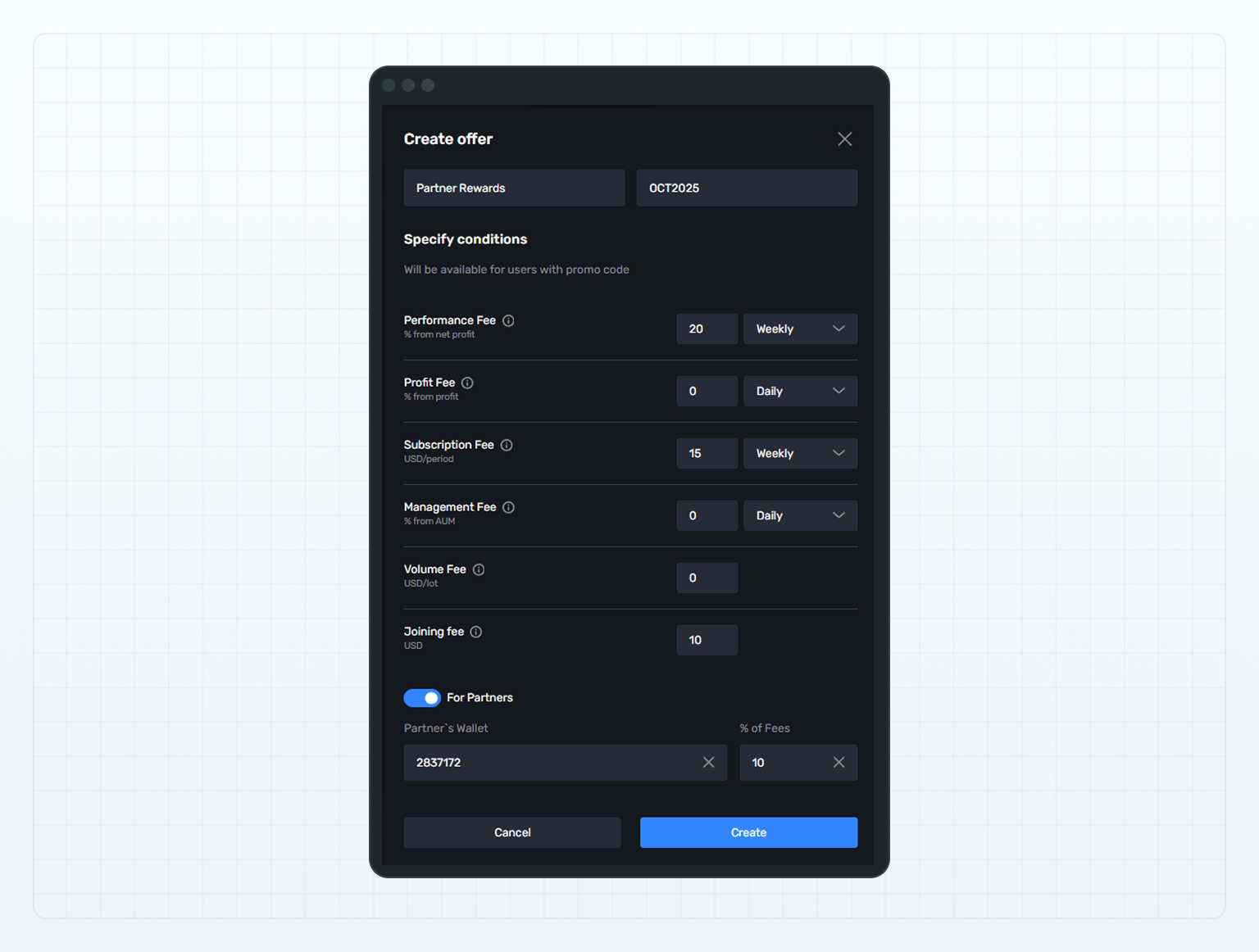
在 添加新优惠（Add new offer）弹窗中，填写以下字段：

* 在 名称（Name）字段中，输入优惠活动的名称。
* 在 优惠码（Promo code）字段中，使用字母、数字或两者的组合输入一个唯一的优惠码。
* 为优惠活动设置费用方案。投资者在订阅您的主账户并输入优惠码后，将看到该费用方案。

  有关费用的更多信息，请参阅**费用列表**。
* 启用 合作伙伴专用（For Partners）开关。
* 启用该开关后，填写随后显示的以下字段：
  * 在 合作伙伴钱包（Partner's Wallet）字段中，输入用于接收费用分成的合作伙伴账户账号。
  * 在 费用比例（% of Fees）字段中，设置分配给合作伙伴的费用百分比。该比例适用于使用优惠码订阅的投资者所支付的全部费用。

<figure><img src="https://1963181118-files.gitbook.io/~/files/v0/b/gitbook-x-prod.appspot.com/o/spaces%2FNxwcNnEuBTBq87kginPk%2Fuploads%2Fgit-blob-3fa4f00156bea8c431a82441abec3aa08fe0414a%2Ffront-add-promo-offer-for-partner.png?alt=media" alt="Add a promo offer sharing fees with a partner"><figcaption><p>Add a promo offer sharing fees with a partner</p></figcaption></figure>
{% endstep %}

{% step %}
点击**创建（Create）**。
{% endstep %}
{% endstepper %}

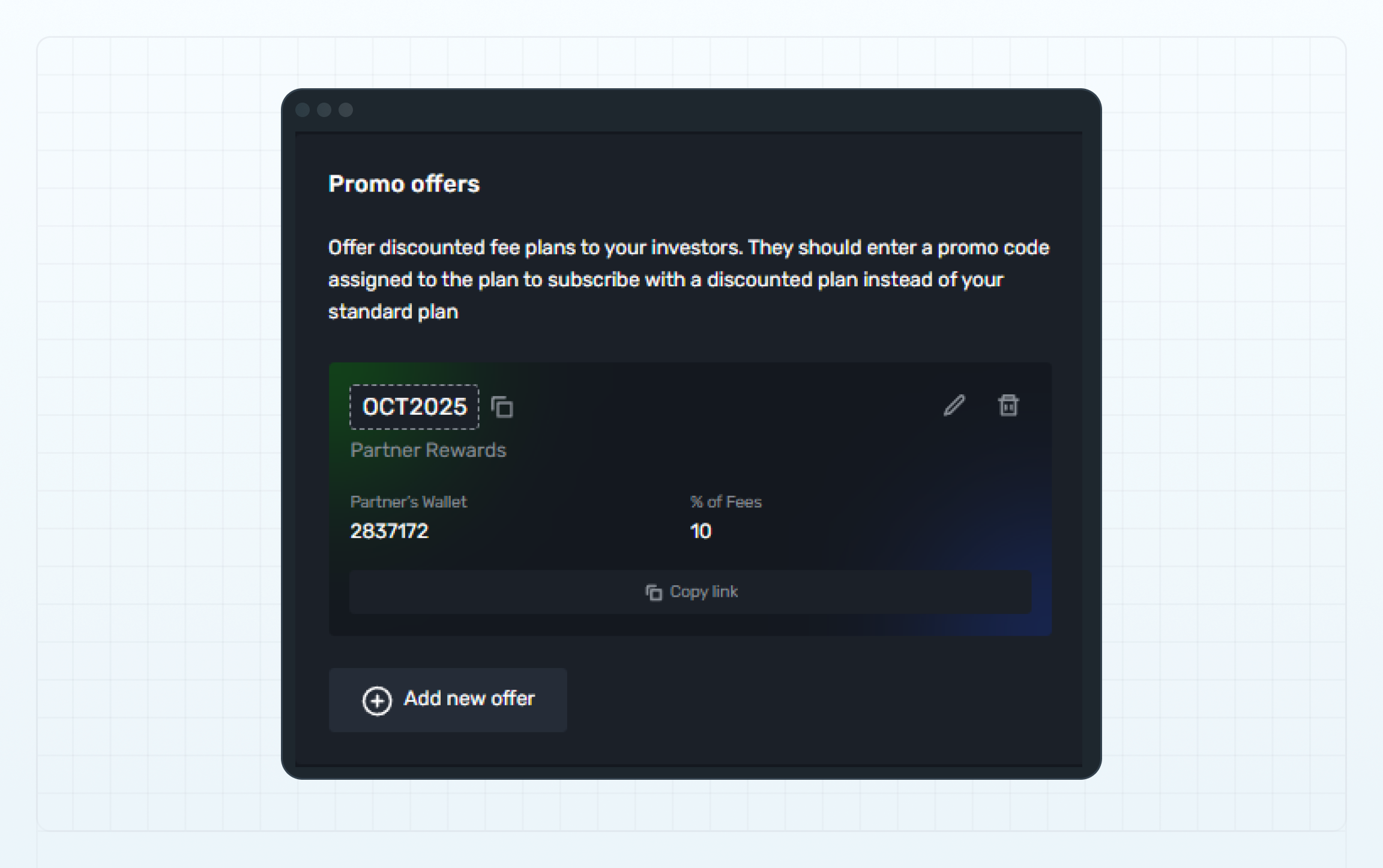
创建的优惠活动将显示在 优惠活动（Promo offers）部分。

如需将分配给该优惠活动的优惠码复制到剪贴板，请点击优惠码旁边的 复制（Copy）按钮。

当优惠活动不再需要时，您可以对其进行编辑或删除。

### 分享包含合作伙伴优惠码的订阅链接

*适用于跟单交易和 MAM*

创建优惠活动后，您可以向合作伙伴分享包含指定优惠码的订阅链接。

合作伙伴可以通过自己的推广渠道分发该链接，例如网站或社交媒体，帮助潜在投资者更便捷地完成订阅。

如需将该链接复制到剪贴板，请点击优惠活动中的 复制链接（Copy link）按钮。

<figure><img src="https://1963181118-files.gitbook.io/~/files/v0/b/gitbook-x-prod.appspot.com/o/spaces%2FNxwcNnEuBTBq87kginPk%2Fuploads%2Fgit-blob-6c44ef07d1dee9e1f26e53a2979342d448ad5617%2Ffront-promo-offer-for-partner.png?alt=media" alt="Copy link"><figcaption><p>Copy link</p></figcaption></figure>

用户打开链接后，将进入主账户订阅表单。表单中的 优惠码（Promo code）字段会自动填写，并显示与该优惠活动关联的费用方案。

该表单以访客模式打开，潜在投资者无需提前登录即可访问，然后继续完成订阅。

如果您的主账户设置了订阅码，该订阅码也会包含在链接中。

{% hint style="info" %}
如果您为 PAMM 主账户创建了优惠活动，则不会显示 复制链接（Copy link）按钮，因为访客模式不支持订阅 PAMM 主账户。
{% endhint %}


---

# Agent Instructions
This documentation is published with GitBook. GitBook is the documentation platform designed so that both humans and AI agents can read, navigate, and reason over technical content effectively. Learn more at gitbook.com.

## Querying This Documentation
If you need additional information that is not directly available in this page, you can query the documentation dynamically by asking a question.

Perform an HTTP GET request on the current page URL with the `ask` query parameter, and the optional `goal` query parameter:

```
GET https://lti.gitbook.io/user_guide/zh-cn/yong-hu-zhi-nan/guan-li-zhu-zhang-hu-he-tou-zi-zhang-hu/she-zhi-yu-he-zuo-huo-ban-gong-xiang-fei-yong-de-you-hui-huo-dong.md?ask=<question>&goal=<endgoal>
```

`ask` is the immediate question: it should be specific, self-contained, and written in natural language.
`goal` is optional and describes the broader end goal you are ultimately trying to accomplish on behalf of the user. GitBook uses it to tailor the answer towards what is most useful for that goal.

The response will contain a direct answer to the question and relevant excerpts and sources from the documentation.

Use this mechanism when the answer is not explicitly present in the current page, you need clarification or additional context, or you want to retrieve related documentation sections.