> For the complete documentation index, see [llms.txt](https://lti.gitbook.io/user_guide/llms.txt). Markdown versions of documentation pages are available by appending `.md` to page URLs; this page is available as [Markdown](https://lti.gitbook.io/user_guide/zh-cn/yong-hu-zhi-nan/guan-li-zhu-zhang-hu-he-tou-zi-zhang-hu/chuang-jian-zhu-zhang-hu.md).

# 创建主账户

如需开始使用跟单交易、MAM 或 PAMM，您首先需要创建一个主账户。账户设置完成后，您可以照常进行交易。

其他交易者可以查看您的交易表现、订阅您的主账户并跟随您的交易策略。

创建主账户：

{% stepper %}
{% step %}
在主菜单中展开相应的服务项目，例如 **LTI Copy Trading**、**MAM** 或 **PAMM**。如果该服务支持多个交易平台，请在所需平台下点击**我的账户（My Accounts）**。
{% endstep %}

{% step %}
如果您还没有任何账户，请点击**主账户（Master）**。

如果您已经拥有主账户，请点击**主账户（Master accounts）区域右上角的新增（Add new）**。
{% endstep %}

{% step %}
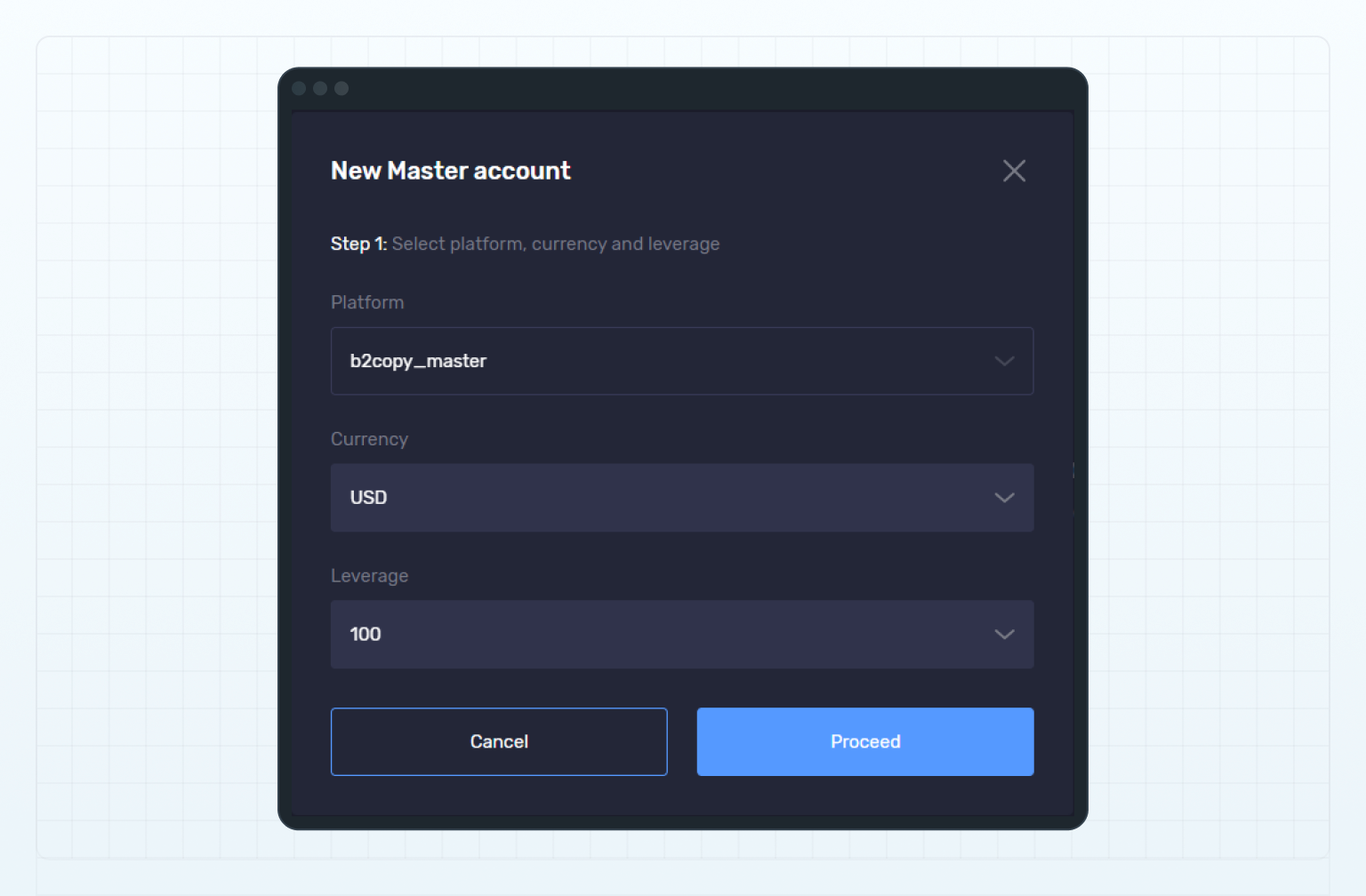
在第 1 步中，填写以下字段：

* 在 平台（Platform）下拉菜单中选择账户组（如有）。
* 在 货币（Currency）下拉菜单中选择主账户的计价货币。
* 在 杠杆（Leverage）下拉菜单中选择杠杆比例。

<figure><img src="https://1963181118-files.gitbook.io/~/files/v0/b/gitbook-x-prod.appspot.com/o/spaces%2FNxwcNnEuBTBq87kginPk%2Fuploads%2Fgit-blob-4df8267e565fb8d543d93eb715af7b5d0b8063f9%2Ffront-new-master-account-step1.png?alt=media" alt="Create a new master account, step 1"><figcaption><p>Create a new master account, step 1</p></figcaption></figure>
{% endstep %}

{% step %}
点击**继续（Proceed）**。
{% endstep %}

{% step %}
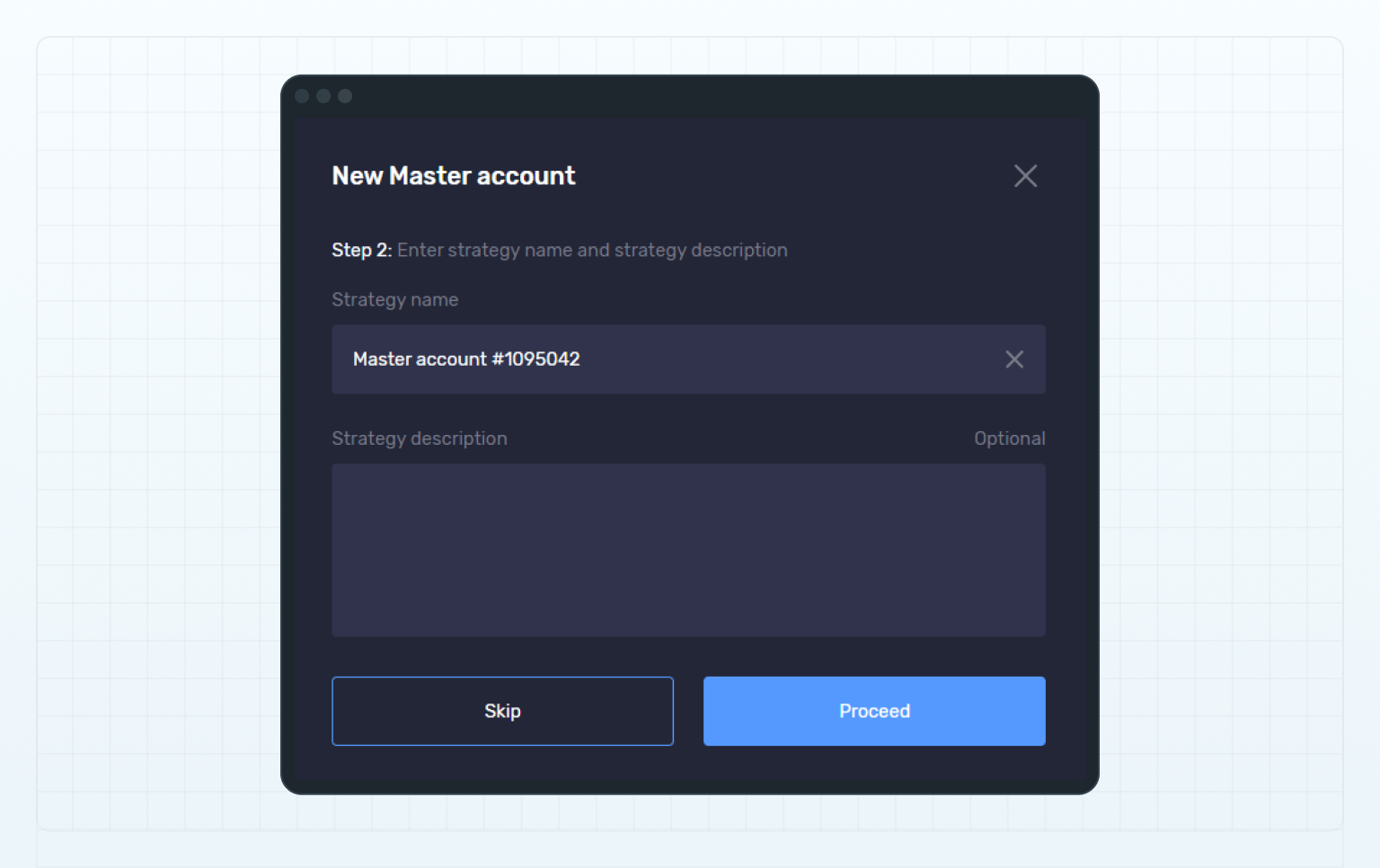
在第 2 步中，您可以填写以下可选设置：

* 在 策略名称（Strategy name）**字段中，输入一个能够体现您交易策略的简短主账户名称。该名称有助于区分不同的主账户，并会显示在**交易员排行榜（Leaderboard）及 Web UI 的其他页面中。

  如果未填写名称，系统将默认使用账户账号。
* 在 策略说明（Strategy description）字段中，填写有关交易策略的详细信息，让潜在投资者了解您的交易方法和交易风格。

您可以跳过第 2 步，并在完成账户创建后添加或更新策略名称和说明。

<figure><img src="https://1963181118-files.gitbook.io/~/files/v0/b/gitbook-x-prod.appspot.com/o/spaces%2FNxwcNnEuBTBq87kginPk%2Fuploads%2Fgit-blob-260aa9ec2960cd4c8b31c07ac4627787b801c4d1%2Ffront-new-master-account-step2.png?alt=media" alt="Create a new master account, step 2"><figcaption><p>Create a new master account, step 2</p></figcaption></figure>
{% endstep %}

{% step %}
点击**继续（Proceed）**。
{% endstep %}

{% step %}
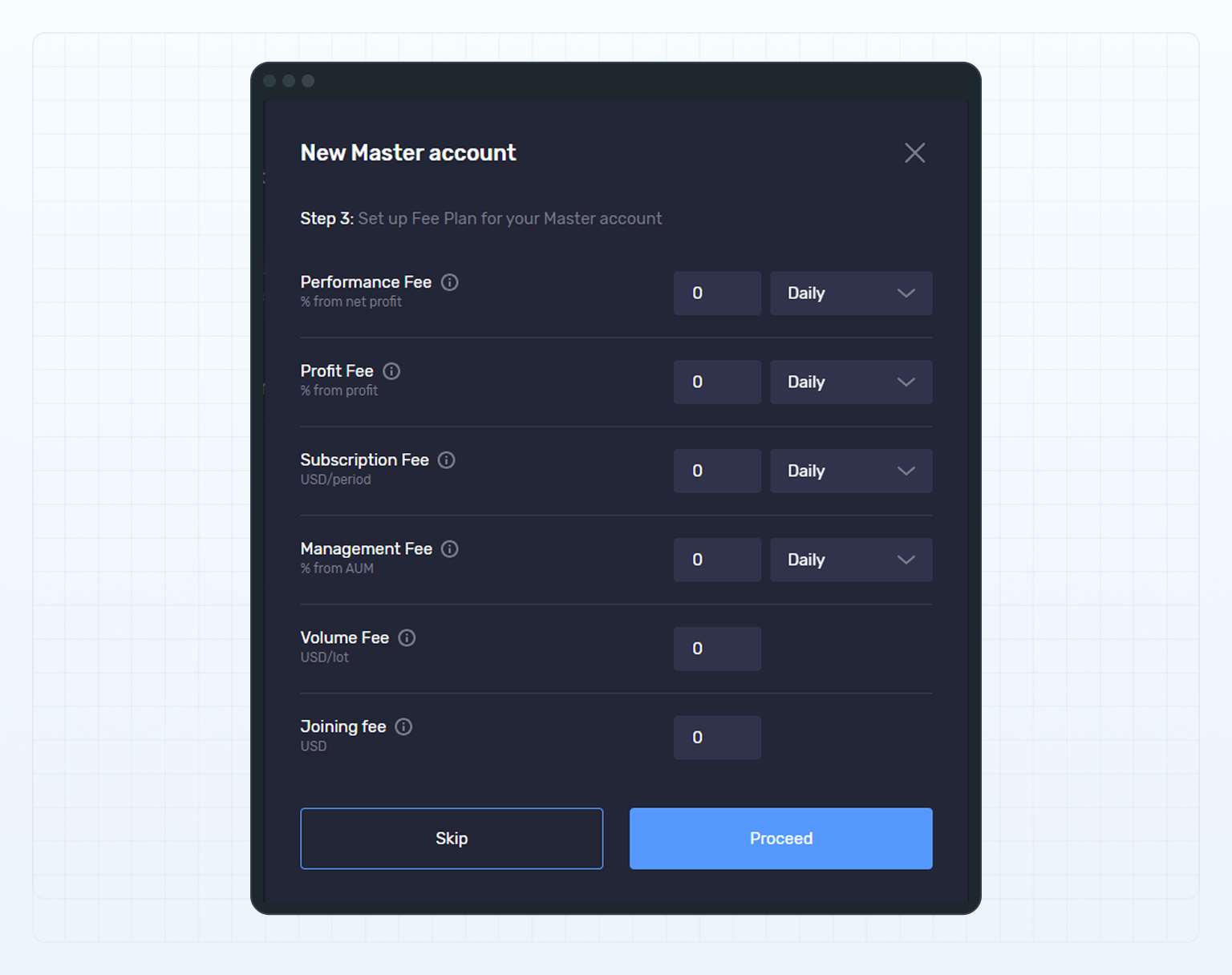
在第 3 步中，为主账户配置费用方案。

费用方案规定向已订阅该主账户的投资账户收取的费用类型、费率和扣费周期。

费率可以使用小数表示。请使用英文句点 `.` 作为小数点分隔符。

有关费用方案中可包含的费用类型，请参阅**费用列表**。

您可以跳过第 3 步，并在完成账户创建后设置费用方案。

<figure><img src="https://1963181118-files.gitbook.io/~/files/v0/b/gitbook-x-prod.appspot.com/o/spaces%2FNxwcNnEuBTBq87kginPk%2Fuploads%2Fgit-blob-85985688cc1889966ad5776efdce73f8c0738482%2Ffront-new-master-account-step3.png?alt=media" alt="Create a new master account, step 3"><figcaption><p>Create a new master account, step 3</p></figcaption></figure>
{% endstep %}

{% step %}
点击**继续（Proceed）**。
{% endstep %}

{% step %}
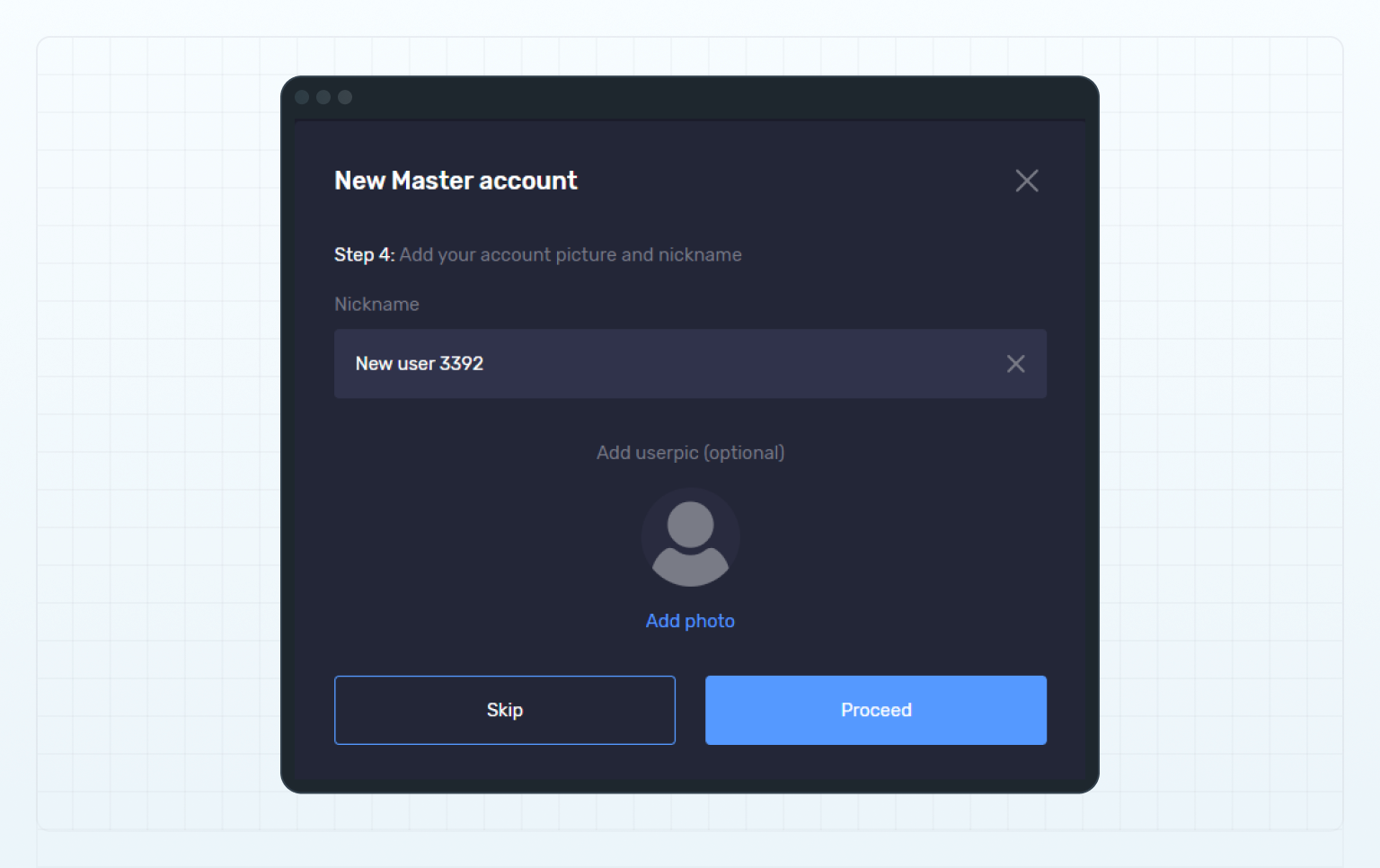
在第 4 步中，您可以选择输入昵称并上传个人资料图片。

如果您的个人资料中已经设置了昵称和个人资料图片，系统会自动将其应用到您的账户。

有关如何添加个人资料图片和昵称，请参阅**添加个人资料图片和昵称**。

<figure><img src="https://1963181118-files.gitbook.io/~/files/v0/b/gitbook-x-prod.appspot.com/o/spaces%2FNxwcNnEuBTBq87kginPk%2Fuploads%2Fgit-blob-6b265702844b67ad72977ced52631bccd538510d%2Ffront-new-master-account-step4.png?alt=media" alt="Create a new master account, step 4"><figcaption><p>Create a new master account, step 4</p></figcaption></figure>
{% endstep %}

{% step %}
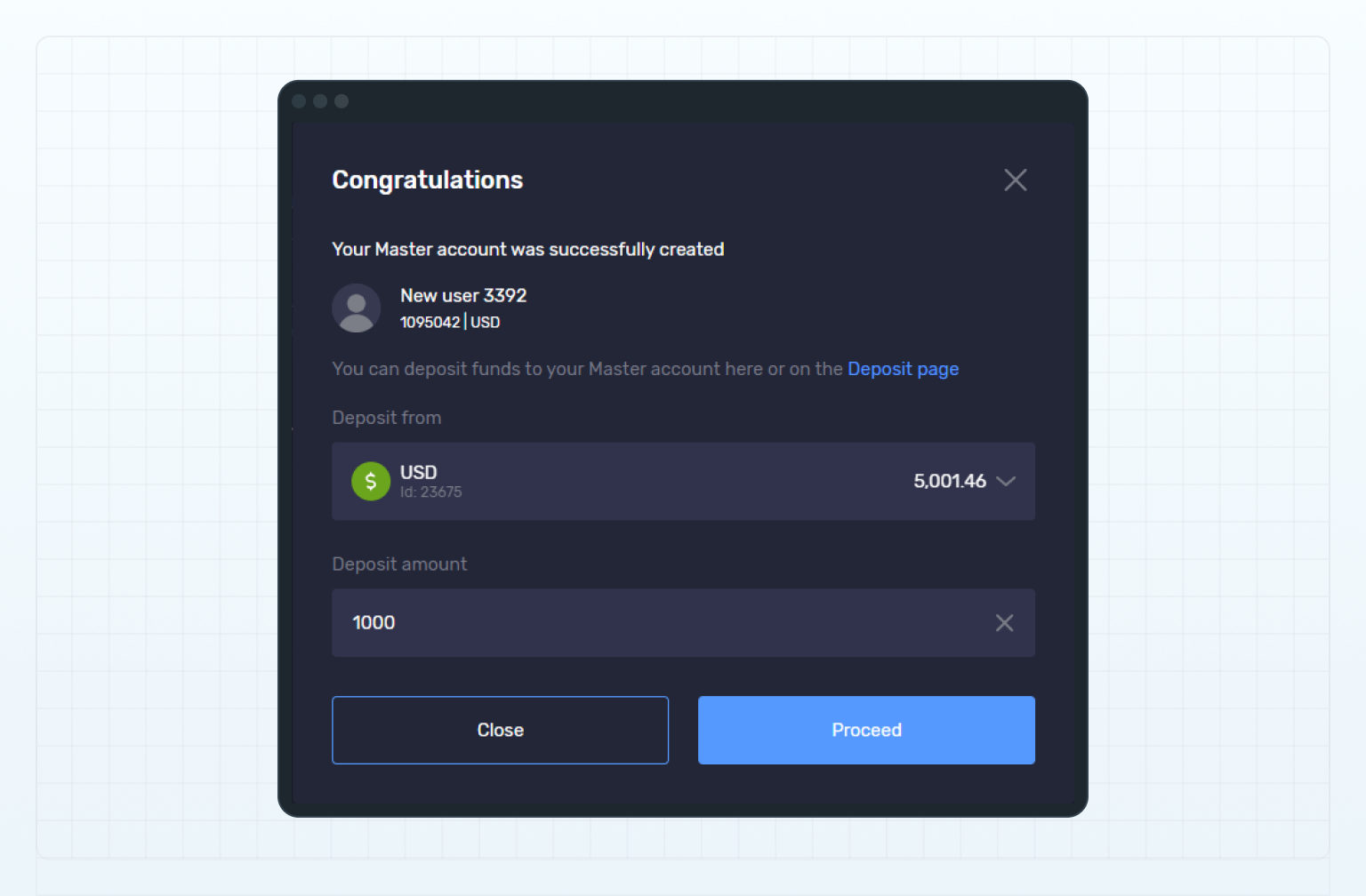
向新创建的跟单交易或 MAM 主账户存入资金，以开始交易。您可以通过以下任一方式完成入金：

* 在**资金来源（Deposit from）下拉菜单中，选择用于转出资金的钱包、其他主账户或投资账户。在入金金额（Deposit amount）字段中输入转账金额，然后点击继续（Proceed）**。
* 您也可以通过**转账（Transfer）页面将资金转入新的主账户。有关详细信息，请参阅向跟单交易和 MAM 账户存入资金**。

<figure><img src="https://1963181118-files.gitbook.io/~/files/v0/b/gitbook-x-prod.appspot.com/o/spaces%2FNxwcNnEuBTBq87kginPk%2Fuploads%2Fgit-blob-d9f6ef8f4e5a860f302a8cb8b7cdbf646d11ebdb%2Ffront-new-master-account-final-step.png?alt=media" alt="Deposit funds"><figcaption><p>Deposit funds</p></figcaption></figure>
{% endstep %}
{% endstepper %}

{% hint style="info" %}
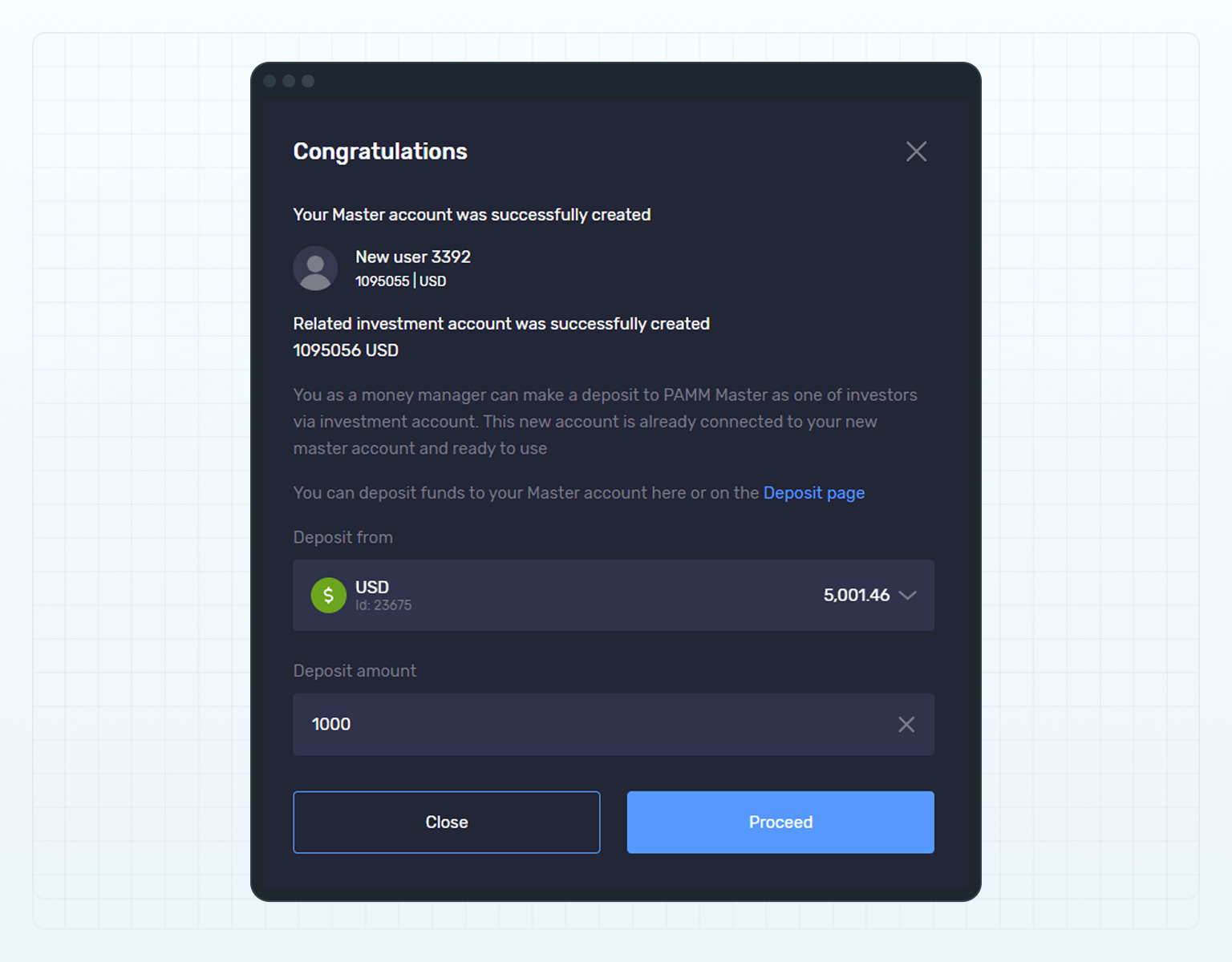
您无法直接向 PAMM 主账户存入资金，因为此类账户不允许执行余额操作。PAMM 主账户的资金来自已订阅该主账户的 PAMM 投资账户。

创建 PAMM 主账户时，系统会自动创建一个 PAMM 投资账户，并将其订阅至新创建的 PAMM 主账户。

如需向 PAMM 主账户增加资金，请将资金存入与其关联的 PAMM 投资账户。
{% endhint %}

<figure><img src="https://1963181118-files.gitbook.io/~/files/v0/b/gitbook-x-prod.appspot.com/o/spaces%2FNxwcNnEuBTBq87kginPk%2Fuploads%2Fgit-blob-1c29b9d7a39f3d3f276e045078a766e7e3945284%2Ffront-new-pamm-master-account-final-step.png?alt=media" alt="Deposit funds to a related PAMM investment account"><figcaption><p>Deposit funds to a related PAMM investment account</p></figcaption></figure>

新创建主账户的详细信息将发送至您的电子邮箱。

您的账户现在会显示在**交易员排行榜**中，投资者可以在排行榜中找到并订阅该账户。


---

# Agent Instructions
This documentation is published with GitBook. GitBook is the documentation platform designed so that both humans and AI agents can read, navigate, and reason over technical content effectively. Learn more at gitbook.com.

## Querying This Documentation
If you need additional information that is not directly available in this page, you can query the documentation dynamically by asking a question.

Perform an HTTP GET request on the current page URL with the `ask` query parameter, and the optional `goal` query parameter:

```
GET https://lti.gitbook.io/user_guide/zh-cn/yong-hu-zhi-nan/guan-li-zhu-zhang-hu-he-tou-zi-zhang-hu/chuang-jian-zhu-zhang-hu.md?ask=<question>&goal=<endgoal>
```

`ask` is the immediate question: it should be specific, self-contained, and written in natural language.
`goal` is optional and describes the broader end goal you are ultimately trying to accomplish on behalf of the user. GitBook uses it to tailor the answer towards what is most useful for that goal.

The response will contain a direct answer to the question and relevant excerpts and sources from the documentation.

Use this mechanism when the answer is not explicitly present in the current page, you need clarification or additional context, or you want to retrieve related documentation sections.