> For the complete documentation index, see [llms.txt](https://lti.gitbook.io/user_guide/llms.txt). Markdown versions of documentation pages are available by appending `.md` to page URLs; this page is available as [Markdown](https://lti.gitbook.io/user_guide/zh-cn/yong-hu-zhi-nan/guan-li-gen-dan-ding-yue/zhong-zhi-he-chong-xin-ji-huo-gen-dan-ding-yue.md).
# 终止和重新激活跟单订阅
终止跟单订阅时,您的投资账户将取消对主账户的订阅。如有需要,您可以重新激活已经终止的跟单订阅。
### 终止跟单订阅
终止跟单订阅后,将发生以下情况:
* 如果该跟单订阅已将未平仓头寸复制到您的投资账户,系统将关闭这些头寸,并按照跟单订阅的费用方案收取费用。之后,该跟单订阅将被终止。
* 如果由于相关头寸在 MT 或 cTrader 平台上的交易时段当前处于关闭状态,导致未平仓头寸无法关闭,则跟单订阅会保持有效状态。相关头寸的交易时段恢复后,系统将在您的投资账户中关闭这些头寸,并按照跟单订阅的费用方案收取费用。之后,该跟单订阅将被终止。
终止跟单订阅:
{% stepper %}
{% step %}
在主菜单中展开相应的服务项目,例如 **LTI Copy Trading**、**MAM** 或 **PAMM**。如果该服务支持多个交易平台,请在所需平台下点击**“我的账户”(My accounts)**。
{% endstep %}
{% step %}
在账户列表中点击相应的投资账户。
{% endstep %}
{% step %}
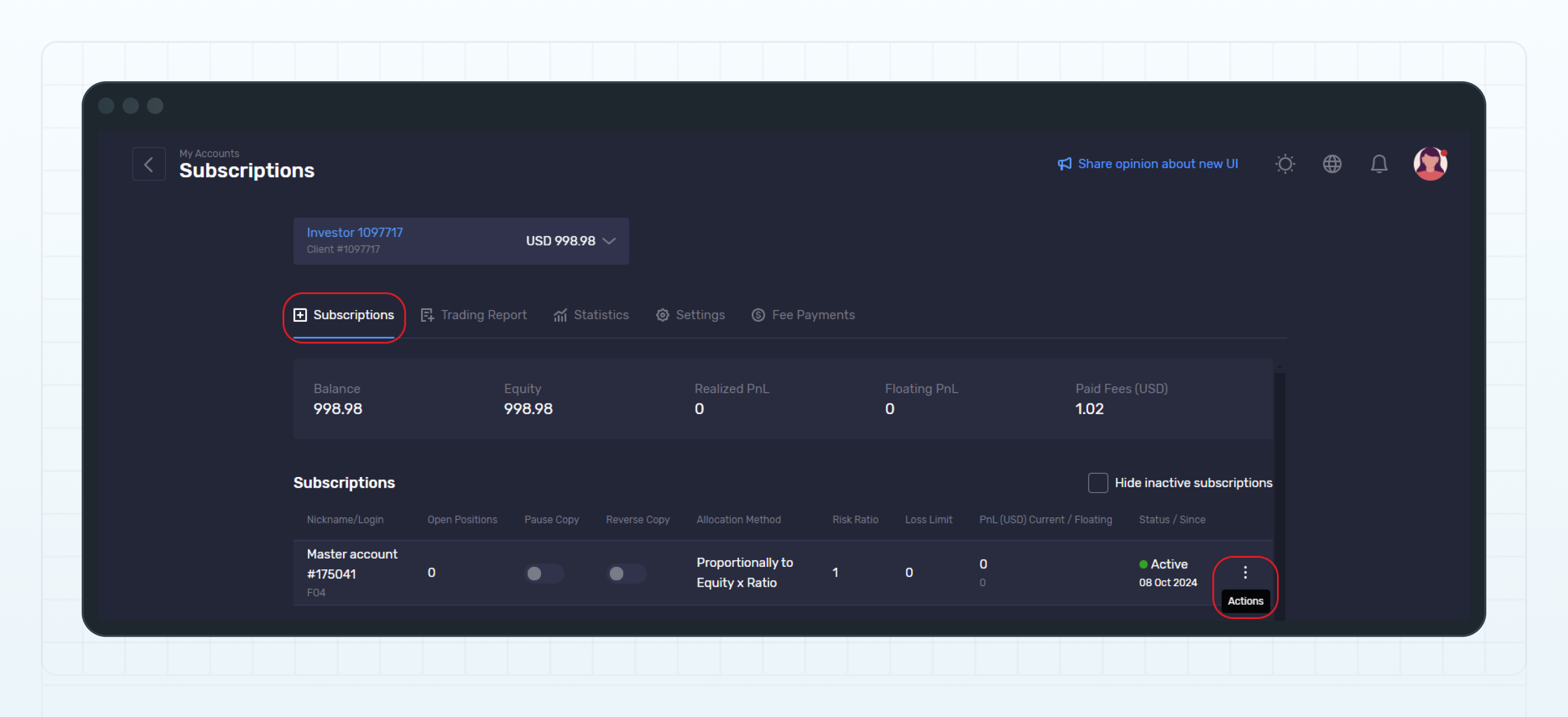
在账户详情中,前往 跟单订阅(Subscriptions)页面。
{% endstep %}
{% step %}
选择您希望终止的跟单订阅。
{% endstep %}
{% step %}
跟单订阅所在行中,点击 ⋮(**操作(Actions)按钮),然后在下拉菜单中选择取消订阅(Unsubscribe)**。
Click Actions
{% endstep %}
{% step %}
在**确认取消订阅(Confirm unsubscription)弹窗中,点击取消订阅(Unsubscribe)**,确认终止所选的跟单订阅。
{% endstep %}
{% endstepper %}
该跟单订阅将被终止,其状态将更改为**已取消订阅(Unsubscribed)**。
### 重新激活跟单订阅
您可以重新激活之前已经终止的跟单订阅。
{% hint style="info" %}
重新激活跟单订阅时,系统将采用主账户当前设置的默认费用方案。该方案可能与您最初接受的费用方案不同。
例如,如果您在首次订阅时使用优惠码获得了一个现已停止使用的费用方案,重新激活订阅时,系统将忽略该费用方案。
建议您在主账户的 统计(Statistics)页面查看当前的费用方案。
{% endhint %}
重新激活跟单订阅后,主账户中现有的未平仓头寸不会复制到投资账户。只有在跟单订阅重新激活后,主账户中新建立的头寸才会复制到投资账户。
重新激活跟单订阅:
{% stepper %}
{% step %}
在主菜单中展开相应的服务项目,例如 **LTI Copy Trading**、**MAM** 或 **PAMM**。如果该服务支持多个交易平台,请在所需平台下点击**“我的账户”(My accounts)**。
{% endstep %}
{% step %}
在账户列表中点击相应的投资账户。
{% endstep %}
{% step %}
在账户详情中,前往 跟单订阅(Subscriptions)页面。
{% endstep %}
{% step %}
选择您希望重新激活的跟单订阅。
{% endstep %}
{% step %}
在跟单订阅所在行中,点击 ⋮(**操作(Actions)按钮),然后在下拉菜单中选择订阅(Subscribe)**。
{% endstep %}
{% endstepper %}
该跟单订阅将重新激活,其状态将更改为**有效(Active)**。
---
# Agent Instructions
This documentation is published with GitBook. GitBook is the documentation platform designed so that both humans and AI agents can read, navigate, and reason over technical content effectively. Learn more at gitbook.com.
## Querying This Documentation
If you need additional information that is not directly available in this page, you can query the documentation dynamically by asking a question.
Perform an HTTP GET request on the current page URL with the `ask` query parameter, and the optional `goal` query parameter:
```
GET https://lti.gitbook.io/user_guide/zh-cn/yong-hu-zhi-nan/guan-li-gen-dan-ding-yue/zhong-zhi-he-chong-xin-ji-huo-gen-dan-ding-yue.md?ask=&goal=
```
`ask` is the immediate question: it should be specific, self-contained, and written in natural language.
`goal` is optional and describes the broader end goal you are ultimately trying to accomplish on behalf of the user. GitBook uses it to tailor the answer towards what is most useful for that goal.
The response will contain a direct answer to the question and relevant excerpts and sources from the documentation.
Use this mechanism when the answer is not explicitly present in the current page, you need clarification or additional context, or you want to retrieve related documentation sections.